
Accepting orders
Recipient, item, and order data are readily available. Therefore, you do not need to enter this data manually again.
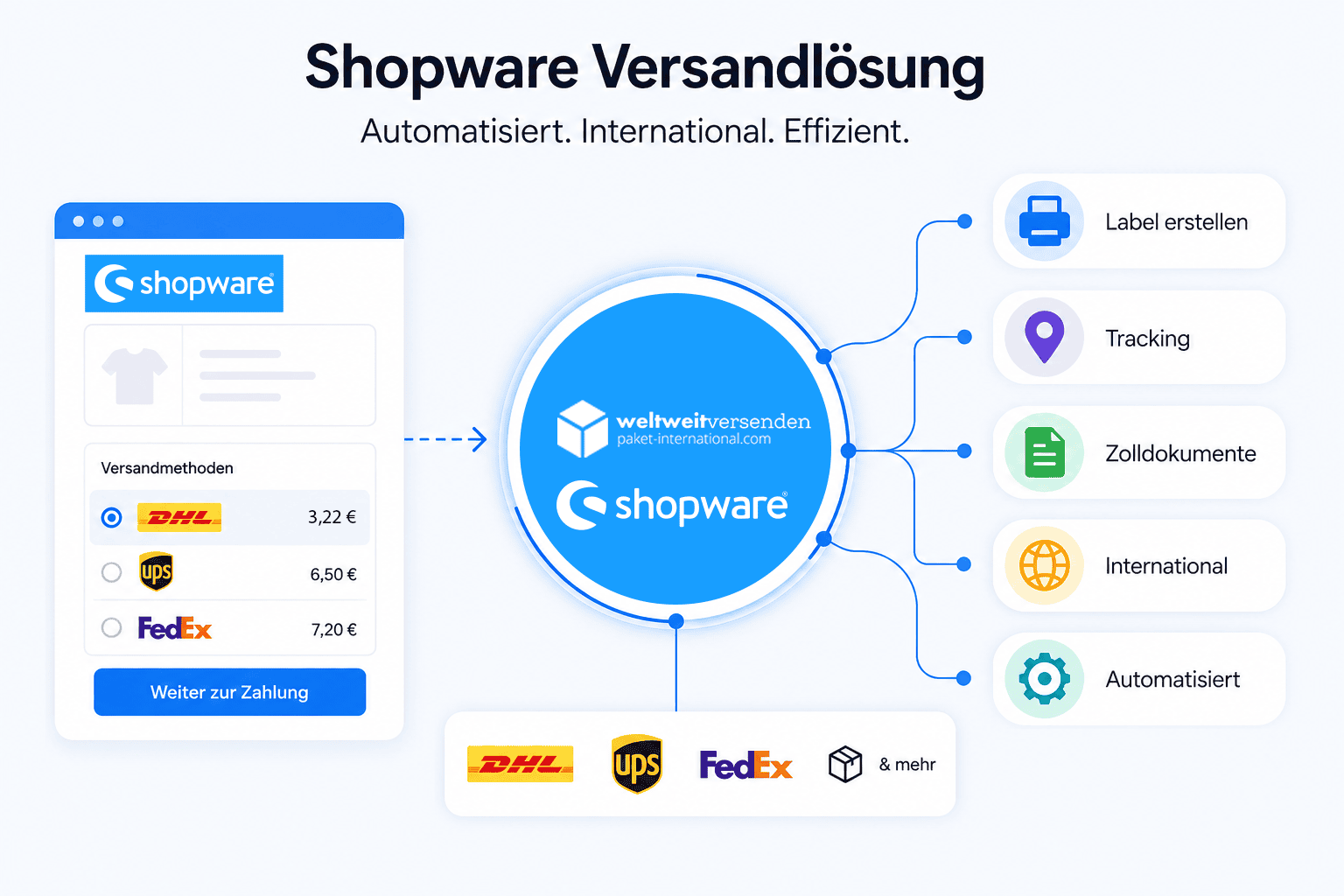
Connect Shopware with Paket International and simplify your shipping. You can import orders directly from Shopware. You can also display suitable shipping options at checkout, compare carriers and services, and create labels. Tracking data is then automatically transferred back to your shop.
With a Shopware shipping integration, you no longer need to manually transfer orders to multiple carrier portals. Instead, order and recipient data can be used directly for shipping.
Furthermore, shipping services can be displayed directly in the checkout. You can also define rules for different orders. After shipment, label and tracking data are automatically assigned to the corresponding Shopware order.
The integration connects your shop directly to shipping. This makes order data available faster. You can also more easily compare carriers and automate many steps.
Recipient, item, and order data are readily available. Therefore, you do not need to enter this data manually again.
Depending on the route, price and duration, you can choose from various carriers and services.
Tracking data is assigned to the Shopware order. This makes it easier to use status messages and customer information.
Customers can see which shipping options are available during the ordering process. This makes the checkout process clearer. It also reduces the need for inquiries about shipping costs and delivery times.
Appropriate shipping prices can be displayed directly in the shop. This allows customers to see the costs more quickly.
Depending on the route and desired delivery time, you can offer standard, economy or express shipping.
DHL, UPS, FedEx and other services can be used together. This keeps shipping flexible.
The following screenshots show actual views from the Shopware setup. Click on an image to open it in its original size.
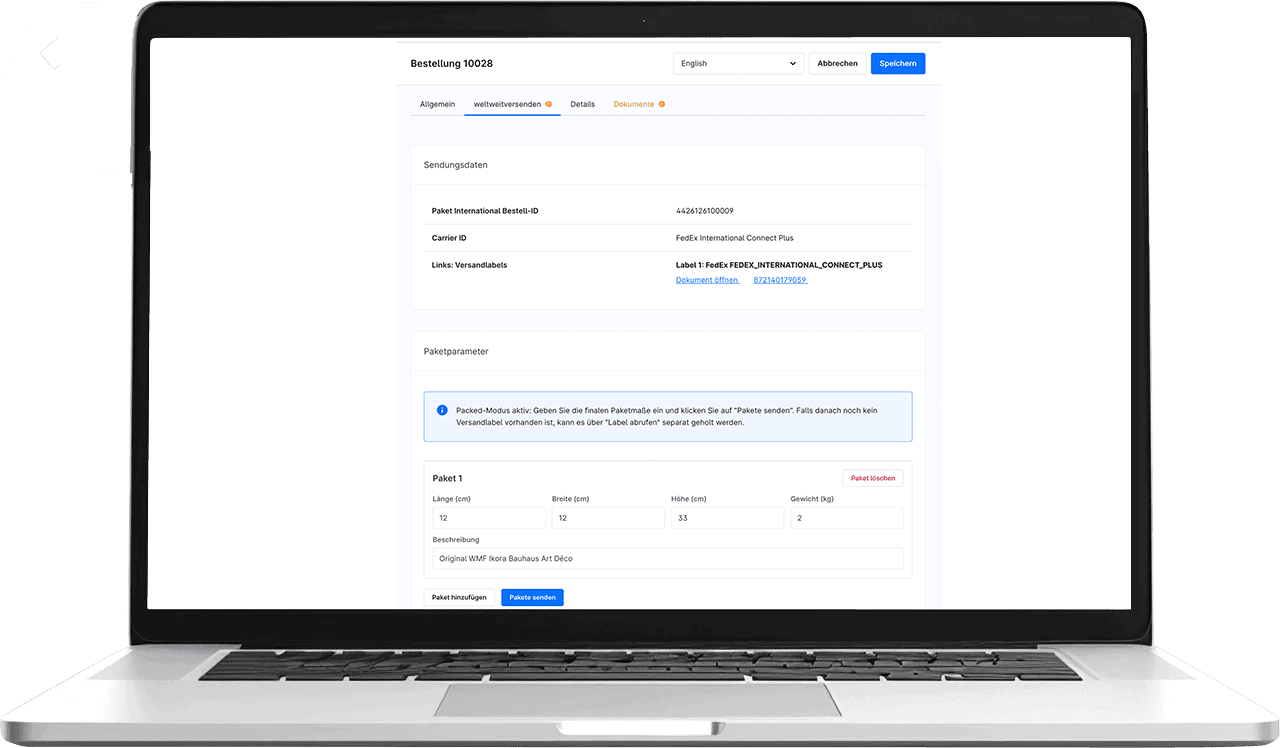
Shipping services are displayed directly where customers complete their order.
Order data and shipping functions are directly integrated, resulting in a simple process.
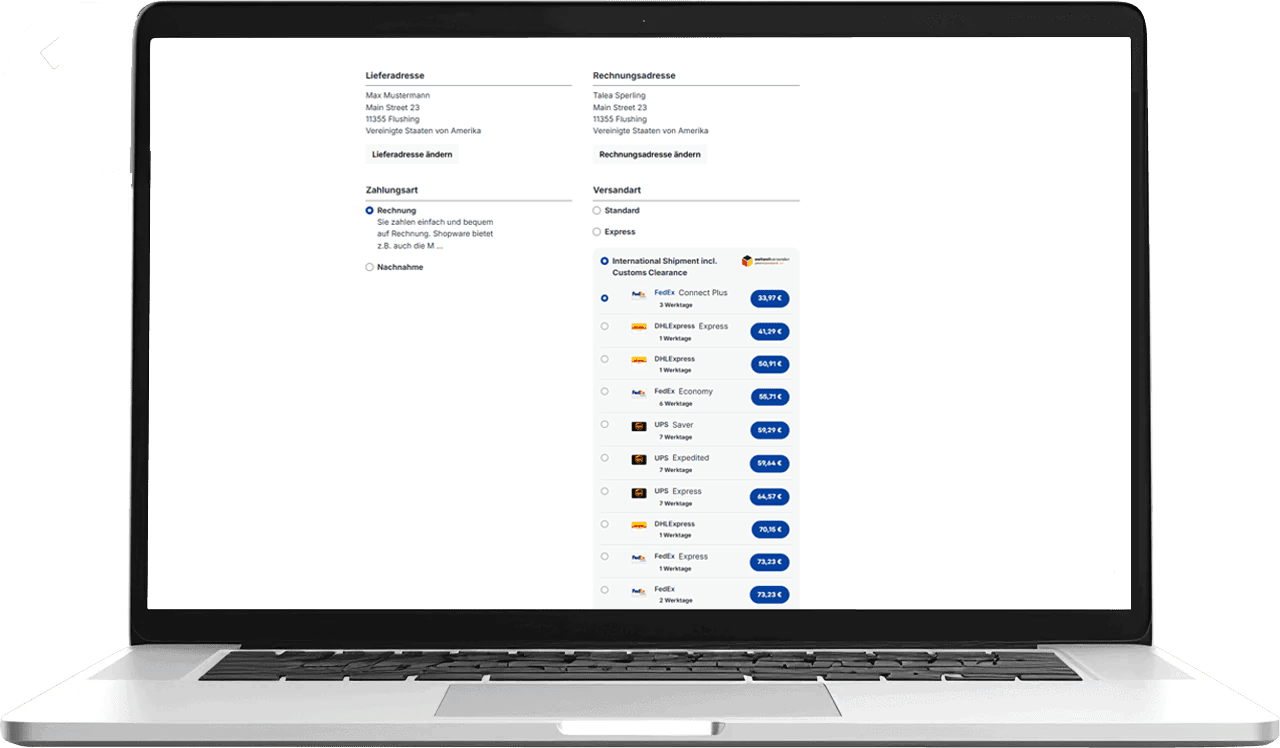
Depending on the order, different carriers and services may be offered.
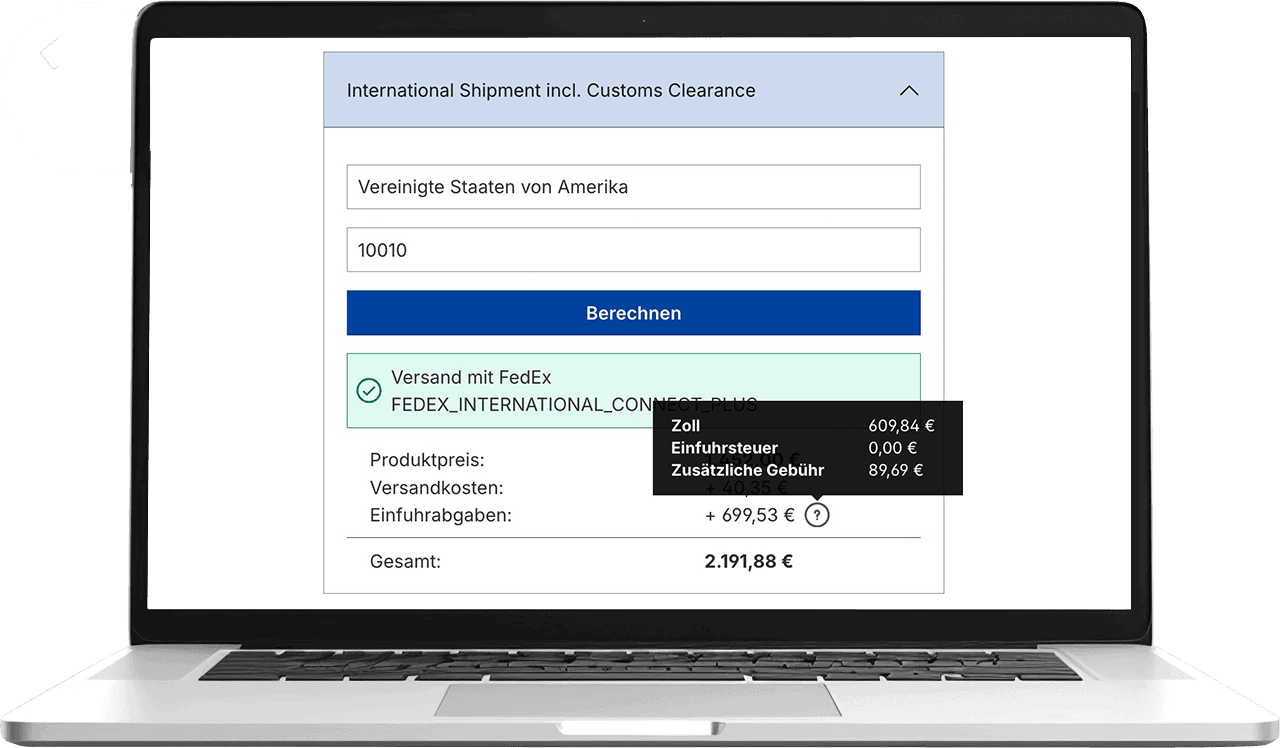
Customers see important shipping costs during the ordering process. This keeps the price transparent.
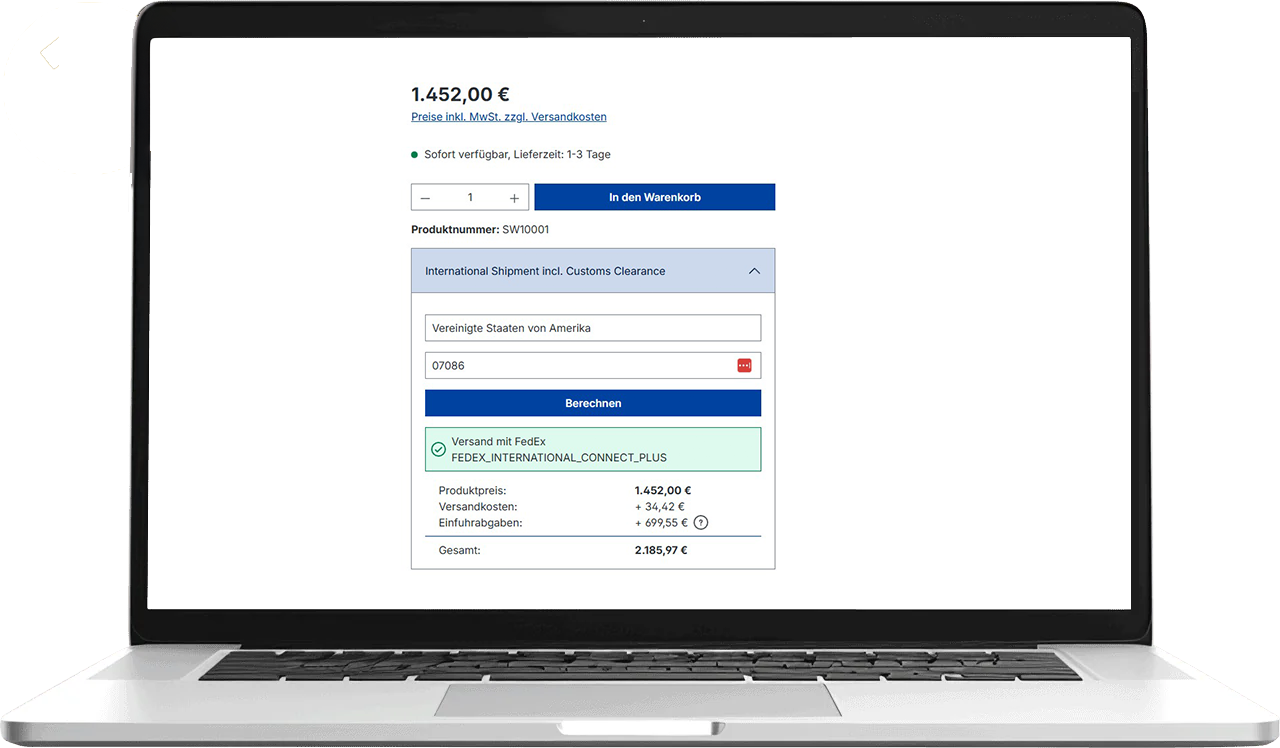
The price of the goods and shipping costs remain clearly visible until the purchase.

The total price remains clearly visible at checkout. This way, customers know what they are paying.
Not every order requires the same shipping method. Therefore, rules help with the selection. This allows suitable services to be automatically prioritized or hidden.
Different shipping options may apply depending on the destination country or market.
Weight and package details can determine which shipping services are available.
Depending on the order value or the order itself, different shipping methods may be offered.
Depending on price, duration, or internal rules, suitable carriers may be preferred.
Express shipping can be specifically displayed for suitable orders or markets.
If there is no rush, cheaper standard services can be preferred.
Shopware provides order, recipient, and product data. This allows shipping to start immediately.
Carrier and service are selected according to the order. Alternatively, predefined rules apply.
The shipping label is created from the existing order and package data.
Tracking data is assigned to the Shopware order. Afterwards, it can be used for order status and customer information.
You don't have to tie your shipping to a single carrier. Instead, you can use different service providers and services depending on the order.
For fast shipments and orders where time is of the essence.
Various parcel and express services for different requirements.
International shipping options for affordable and fast deliveries.
The more orders you process, the more time manual steps take. Furthermore, the risk of errors and queries increases.
| Area | Manual process | With Shopware integration |
|---|---|---|
| Order details | transferred to carrier portals | use directly for shipping |
| Shipping costs | static or separately maintained | Display suitable services at checkout |
| Carrier selection | Manual comparison | Consider multiple services centrally |
| Labels | generate in individual portals | create from existing order data |
| Tracking | Enter manually in Shopware | reassign to the order |
It connects Shopware directly to shipping. This allows order data to be imported, shipping services to be used, and labels to be created. Tracking data is also automatically assigned back to the order.
The integration is designed for modern Shopware processes. Therefore, we check the Shopware version and technical setup before installation.
Depending on the setup, suitable shipping services and shipping costs can be displayed directly in the Shopware ordering process.
Depending on the route and availability, services such as DHL Express, UPS, FedEx and others can be used.
Order, recipient, and item data can be ready for immediate shipment. The degree of automation depends on the chosen setup.
Yes. Labels can be created from the existing order and package data. They are then assigned to the corresponding order.
Yes. Rules can be based on criteria such as destination country, weight, shopping cart value, or desired service.
Tracking data can be assigned to the respective order. This makes it easier to manage status, customer information, and support.
This is especially beneficial for Shopware shops with regular shipping, multiple carriers, or growing order volumes. Furthermore, integration is worthwhile if many steps are still performed manually.
Yes. The integration can be used for national and international shipments. Which services are available depends on the target market.
Connect orders, shipping services, labels and tracking in one simple process.